



Introducing Google’s Notification Organizer for Pixel Devices
Overview of the Notification Organizer
Google has recently announced the rollout of its new Notification Organizer feature with the Android 16 QPR2 update for Pixel devices. Designed to enhance user experience, this feature aims to streamline notifications, making it easier to manage alerts from various applications.
How to Access the Notification Organizer
To utilize the Notification Organizer on your device, navigate to Settings > Notifications > Notification organizer once the feature is available. Unlike the AI Summaries, the Notification Organizer is enabled by default, ensuring immediate accessibility for users.
Supported Languages and Regions
Currently, the Notification Organizer feature is available for users whose primary system language is set to English. It can be accessed in several countries, including:
- Australia
- Canada
- Germany
- Japan
- United Kingdom
- United States
Notification Categories
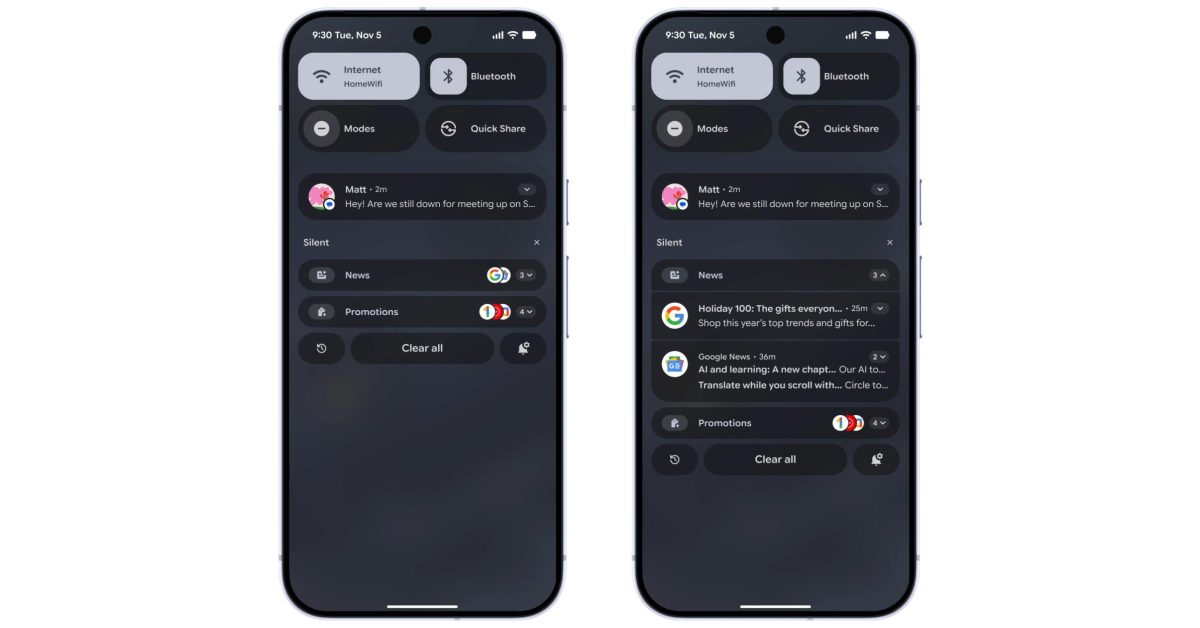
The Notification Organizer sorts alerts into four distinct categories: Promotions, News, Social, and Suggested. While Promotions and News are automatically enabled, users need to activate Social and Suggested notifications. Additionally, there is an option to “Always expand bundles” for better visibility of notifications.
User Interaction with Notifications
In terms of user interaction, the Organizer appears under the “Silent” section within the notification shade. Each notification category is marked with an AI-inspired sparkle icon, while app icons are conveniently stacked to the right. Users can tap to expand these bundles, allowing them to view and interact with the entire set of notifications.
Troubleshooting and Availability
If the Notification Organizer has not yet appeared on your Pixel device, a simple restart may resolve the issue. Many users have reported successfully accessing the feature on the Pixel 10 series, showcasing Google’s commitment to enhancing user interfaces.
FTC: We use income earning auto affiliate links. More.

